
Searchable security knowledge
Practical answers for planning, installing, and managing your security system.
Find clear guidance on cameras, alarms, monitoring, access, AXIS, UniFi, pricing, service, and privacy. Answers are prepared and reviewed by Javier Santiago, Security Solutions Manager, and Security Solutions Engineers Josh Mard and Isaac Chase. Final compatibility, code, privacy, retention, monitoring, and performance decisions remain property-specific.
Detailed guidance across the complete security knowledge center.
Frequently asked questions
Answers for planning, products, installation, and support.
All answers shown
Planning & company
Starting a project, service coverage, assessments, and choosing the right approach.
Planning & companyWhat services does Three Factor Security provide?+
Three Factor Security designs, installs, upgrades, monitors, and supports professional security camera systems, alarm systems, access control, intercoms, gates and perimeter security, live monitoring, early detection, security audio, network infrastructure, storage, and related integrations.
Planning & companyDo you work with homes, businesses, and multifamily properties?+
Yes. We work with residential properties, estates, businesses, commercial buildings, industrial sites, HOAs, apartment and condominium communities, hospitality properties, retail locations, warehouses, and other managed environments.
Planning & companyWhich areas do you serve?+
Our primary service area includes Los Angeles County, Orange County, and Ventura County. Scheduling, travel, permits, and service availability are confirmed for the specific property.
Planning & companyIs the initial risk assessment free?+
Yes. New clients can begin with the free guided risk assessment. A team member reviews the property type, concerns, current equipment, and requested outcome before recommending the next step.
Planning & companyDo I need an on-site assessment before receiving a final proposal?+
Many projects require a site visit because pathways, mounting conditions, power, network access, door hardware, lighting, storage, code requirements, and existing equipment can materially change the scope. Simple replacements or clearly documented work may sometimes be evaluated remotely.
Planning & companyCan you take over or upgrade an existing security system?+
Often. We inspect the equipment, credentials, wiring, recorder, network, storage, licensing, documentation, and manufacturer support status. Reusable components are identified, while unsupported or unreliable parts are documented before an upgrade is proposed.
Planning & companyDo you provide both design and installation?+
Yes. Our work can include risk review, system design, product selection, cable and pathway planning, installation, programming, testing, documentation, user setup, training, and ongoing support.
Planning & companyHow do I choose between repairing, expanding, or replacing a system?+
The decision should consider reliability, age, available channels, storage, cybersecurity, image quality, manufacturer support, integration needs, repair history, and the cost of keeping the old system operational. We compare the practical lifecycle of each option.
Cameras & recording
Camera selection, image quality, storage, remote viewing, and evidence retrieval.
Cameras & recordingHow many security cameras does my property need?+
Camera count depends on entrances, exits, parking, perimeter exposure, cash or inventory areas, common spaces, blind spots, required identification detail, and the desired overlap between views. A camera layout should be based on coverage objectives rather than a generic camera-per-square-foot formula.
Cameras & recordingDo I need 4K security cameras everywhere?+
Not always. Resolution is only one part of usable video. Lens choice, viewing distance, angle, lighting, shutter settings, bitrate, compression, and placement often matter more. 4K is valuable where greater detail is required, but lower-resolution cameras may be appropriate for overview views.
Cameras & recordingWhat is the difference between dome, turret, bullet, panoramic, and PTZ cameras?+
Dome and turret cameras are compact fixed views, bullet cameras provide a visible directional form, panoramic cameras cover wide areas with one or more sensors, and PTZ cameras can be directed and zoomed. The correct form depends on environment, distance, mounting, vandal resistance, maintenance, and operational use.
Cameras & recordingCan cameras record if the internet goes down?+
A properly designed local recording system can generally continue recording while the cameras, network, recorder, and power remain operational. Remote access, cloud services, notifications, or off-site integrations may be limited until connectivity returns.
Cameras & recordingHow many days of video storage should I keep?+
Retention should match the time it typically takes to discover an incident, any insurance or regulatory needs, operating hours, camera count, resolution, frame rate, bitrate, motion level, and available storage. Thirty days is common, but some properties need shorter or much longer retention.
Cameras & recordingWhat determines video storage capacity?+
Storage depends on camera count, resolution, frame rate, compression, bitrate, scene activity, continuous versus event recording, audio, retention target, redundancy, and export requirements. Use the storage estimator for early planning, then validate the design with actual camera profiles.
Cameras & recordingWhat is the difference between an NVR, DVR, and cloud recording?+
An NVR records compatible IP camera streams over a network. A DVR commonly records analog or HD-over-coax cameras. Cloud recording stores supported video remotely. Some systems combine local recording with cloud access or archiving.
Cameras & recordingCan existing camera wiring be reused?+
Sometimes. Existing Cat6, fiber, coax, conduit, and power should be tested for condition, distance, terminations, grounding, bandwidth, and compatibility. Reusing verified infrastructure can reduce cost, but damaged or undocumented pathways should not be assumed reliable.
Cameras & recordingCan I view cameras from my phone, tablet, or computer?+
Most modern systems provide supported mobile and desktop access. User roles, multi-factor authentication, remote connectivity, notification settings, and camera permissions should be configured during handoff.
Cameras & recordingCan I give different users access to different cameras?+
Yes, when supported by the selected platform. Permissions can often be limited by site, camera, live view, playback, export, administration, or schedule. Access should follow the least-privilege principle and be reviewed when staff or board members change.
Cameras & recordingDo security cameras record audio?+
Some cameras support microphones or two-way audio, but laws, workplace policies, customer expectations, signs, and consent requirements may apply. Audio should be enabled only after the property owner confirms the lawful and appropriate use.
Cameras & recordingWhat is license plate recognition?+
License plate recognition uses a dedicated camera position, lens, shutter, lighting strategy, and software workflow to capture and search plates. A general overview camera usually cannot replace a properly designed LPR view.
Alarms & early detection
Intrusion detection, sensors, permits, notifications, and proactive protection.
Alarms & early detectionWhat is the difference between a door contact, motion detector, and glass-break detector?+
A door contact detects an opening, a motion detector evaluates movement within a protected area, and a glass-break detector listens for supported acoustic signatures. Layering sensors can improve coverage when selected and positioned correctly.
Alarms & early detectionShould an alarm system be professionally monitored or self-monitored?+
Professional monitoring can route supported alarms through a monitoring center and an approved response plan. Self-monitoring sends alerts to designated users. The choice depends on risk, occupancy, response expectations, insurance, budget, and local permit requirements.
Alarms & early detectionDo you install Ajax alarm systems?+
Yes. Ajax can be considered for supported residential and commercial intrusion applications, including hubs, contacts, motion sensors, glass-break sensors, keypads, sirens, and selected visual verification. Final design depends on range, construction, communications, and monitoring requirements.
Alarms & early detectionWhat is perimeter or early detection?+
Early detection uses supported cameras, analytics, beams, radar, thermal devices, fence sensors, or other technologies to identify activity before a person reaches the building or critical area. False-alarm control and response procedures are essential.
Alarms & early detectionCan alarm events include images or video verification?+
Supported systems can associate snapshots or video with an alarm event. This may help authorized users or monitoring personnel evaluate the event before following the approved response plan.
Alarms & early detectionWill an alarm work during a power or internet outage?+
Performance depends on backup battery, communication path, cellular service, network equipment, power supply, and system design. Backup duration and communication failure alerts should be tested and documented.
Alarms & early detectionDo I need an alarm permit?+
Many Southern California jurisdictions require an alarm permit or registration and may assess fees for false alarms. Requirements vary by city and property. The owner remains responsible for current permits, contact information, and local compliance.
Alarms & early detectionHow are false alarms reduced?+
Correct sensor selection, placement, environmental review, entry and exit timing, user training, verification, maintenance, clean contact lists, and documented response procedures can reduce avoidable alarms.
Monitoring & response
Live video review, virtual guarding, event verification, and escalation procedures.
Monitoring & responseWhat is live video monitoring?+
Live video monitoring uses authorized personnel or a supported service to review configured camera events or scheduled views and follow a documented response plan. It is different from simply receiving motion notifications on a phone.
Monitoring & responseWhat is a virtual security guard?+
A virtual security guard service combines cameras, analytics, remote review, audio deterrence when available, documentation, and an approved escalation procedure to help address after-hours or perimeter activity.
Monitoring & responseCan monitored cameras trigger a live voice warning?+
Supported systems can allow trained personnel or automated rules to play an approved message through compatible speakers. Audio design, site policy, local rules, network reliability, and the response plan must be considered.
Monitoring & responseDoes video monitoring replace an on-site security guard?+
Not always. Remote monitoring can improve coverage and verification, but it cannot perform every physical task. Many properties use remote monitoring alone for selected risks or combine it with on-site personnel.
Monitoring & responseWhat events can be sent for monitoring?+
Depending on the platform, events may include person or vehicle detection, line crossing, loitering, intrusion zones, alarm inputs, door events, audio events, camera tampering, or system health conditions.
Monitoring & responseCan monitoring contact police or other responders?+
An approved monitoring and escalation plan may include contacting designated property representatives, a guard service, emergency services, or other responders. Dispatch eligibility and verification requirements depend on the event, service, jurisdiction, and agreement.
Monitoring & responseHow is monitoring priced?+
Pricing depends on the number of monitored cameras or devices, schedule, event volume, analytic quality, audio needs, response steps, integrations, and reporting. See the Cost & Pricing Guide for rough starting ranges.
Monitoring & responseHow is privacy handled during monitoring?+
Monitoring should be limited to authorized views, schedules, events, users, and purposes. Privacy masks, restricted camera access, audit logs, retention rules, and documented authorization can reduce unnecessary access.
Access & intercoms
Doors, gates, credentials, visitor entry, intercoms, and safe egress.
Access & intercomsHow does an access control system work?+
A reader sends a credential request to a controller or managed platform. The system checks the user, opening, schedule, and permissions, records the event, and operates compatible locking hardware while maintaining required egress and life-safety behavior.
Access & intercomsWhat credentials can be used for access control?+
Supported options can include cards, fobs, PINs, mobile credentials, QR codes, temporary visitor credentials, and—in selected systems—biometric or wallet-based credentials. The choice should match security level, user population, privacy, and administration needs.
Access & intercomsWhat is the difference between an electric strike and a magnetic lock?+
An electric strike releases the latch at the frame, while a magnetic lock secures the door using powered magnetic force. Door construction, fire rating, egress, accessibility, request-to-exit, power loss behavior, and local requirements determine what is appropriate.
Access & intercomsWhat is fail-safe versus fail-secure locking?+
Fail-safe hardware unlocks when power is removed. Fail-secure hardware remains secured from the entry side during power loss while still allowing required egress. The correct configuration is selected opening by opening with applicable code and fire requirements.
Access & intercomsCan access control operate a vehicle gate or garage door?+
Often. Integration may require a compatible relay, gate operator input, safety devices, vehicle loop or sensor coordination, door position feedback, credential reader, intercom, network or cellular connection, and approved emergency operation.
Access & intercomsCan an intercom let staff see and speak with visitors?+
Yes. Supported video intercoms can provide live video, two-way audio, directory calling, mobile or station notifications, and authorized release of a connected door or gate.
Access & intercomsCan temporary access be issued to vendors or guests?+
Many systems support time-limited cards, mobile credentials, PINs, or QR codes. The property should define identity verification, permitted openings, schedule, expiration, recordkeeping, escort rules, and revocation.
Access & intercomsCan existing doors and locks be reused?+
Sometimes. Each opening must be evaluated for frame and door condition, lock type, fire rating, egress hardware, accessibility, power transfer, request-to-exit, door position, pathways, and inspection requirements.
AXIS Communications
Professional AXIS cameras, analytics, video management, cybersecurity, and specialized applications.
AXIS CommunicationsWhy choose AXIS cameras?+
AXIS offers a broad professional portfolio for network video, audio, intercoms, access control, analytics, radar, thermal imaging, and specialized environments. It is often selected when image usability, open integration, lifecycle support, cybersecurity, or complex applications are priorities.
AXIS CommunicationsIs Three Factor Security an AXIS partner?+
Yes. Three Factor Security is an AXIS Communications Solution Gold Partner. Visit our AXIS Gold Partner page for our installation and integration approach.
AXIS CommunicationsWhat is AXIS Lightfinder?+
AXIS Lightfinder is designed to improve usable color video and reduce motion blur in low-light scenes. Results still depend on the selected model, lens, scene lighting, shutter settings, mounting, and the movement being captured.
AXIS CommunicationsWhat is AXIS Forensic WDR?+
Forensic WDR is designed for scenes with both very bright and very dark areas. It combines exposures and image processing to preserve useful detail in challenging lighting such as entrances, loading areas, and backlit interiors.
AXIS CommunicationsWhat is AXIS Zipstream?+
AXIS Zipstream is a video compression technology intended to reduce bandwidth and storage while preserving important forensic detail. Actual savings depend on the scene, movement, lighting, compression settings, frame rate, and retention requirements.
AXIS CommunicationsCan AXIS cameras perform analytics at the edge?+
Many AXIS devices support on-camera analytics for compatible object, motion, line-crossing, occupancy, audio, or other events. Available analytics depend on the exact camera, ARTPEC platform, AXIS OS version, application, scene, and required accuracy.
AXIS CommunicationsCan AXIS cameras integrate with other video management systems?+
Many AXIS products support open interfaces and integrations with professional VMS platforms. Compatibility must be checked for the exact camera, firmware, codec, analytic events, audio, PTZ, access control, licenses, and desired workflow.
AXIS CommunicationsWhat recording software can be used with AXIS cameras?+
Options can include supported AXIS video management software and compatible third-party VMS platforms. The right choice depends on camera count, sites, integrations, retention, user roles, IT standards, analytics, failover, and long-term administration.
AXIS CommunicationsDoes AXIS support license plate recognition?+
Yes. AXIS offers cameras and analytics for supported license plate recognition applications. Reliable results require a dedicated capture view, correct distance and angle, controlled shutter and exposure, suitable lighting, and an approved operating and privacy policy.
AXIS CommunicationsCan AXIS cameras record to an SD card?+
Many AXIS cameras support compatible edge storage. SD recording may provide local resilience, failover, or a small standalone solution, but card endurance, retention, health monitoring, tamper risk, export workflow, and centralized recording requirements must be considered.
AXIS CommunicationsWhat is AXIS Edge Vault?+
AXIS Edge Vault is a hardware-based cybersecurity platform available on supported devices. Depending on the product, it can support device identity, secure key storage, signed software, secure boot, and protection of sensitive information.
AXIS CommunicationsAre AXIS systems appropriate for large or multi-site properties?+
Yes. AXIS products can support small professional systems through large multi-site deployments when paired with suitable networking, video management, storage, user governance, monitoring, and lifecycle planning.
UniFi Protect, Access & Identity
UniFi Protect, Access, Intercom, Identity, networking, storage, and migration questions.
UniFi Protect, Access & IdentityWhat is UniFi Protect?+
UniFi Protect is Ubiquiti's camera security and video management platform. It combines supported cameras, local recording hardware, user management, mobile and web access, detections, alerts, exports, and multi-site administration.
UniFi Protect, Access & IdentityDoes UniFi Protect require monthly camera licensing fees?+
Ubiquiti currently presents core UniFi Protect recording and management without per-camera licensing fees. Equipment, drives, network infrastructure, optional cloud archiving, professional monitoring, and third-party services remain separate, and current platform terms should be confirmed for each project.
UniFi Protect, Access & IdentityDoes UniFi Protect store recordings locally?+
Yes. Supported UniFi consoles and network video recorders store footage locally on compatible storage. Optional remote access creates a secure connection to the local system, and supported export or archiving workflows can be configured separately.
UniFi Protect, Access & IdentityWill UniFi cameras keep recording during an internet outage?+
Local recording can generally continue if the cameras, PoE network, console or NVR, storage, and power remain operational. Remote viewing, cloud-connected alerts, and off-site services may be affected until internet service returns.
UniFi Protect, Access & IdentityWhich UniFi console or NVR do I need?+
The correct recorder depends on camera models, camera count, resolution, retention, drive capacity, redundancy goals, concurrent viewing, detections, future expansion, and whether the site also needs UniFi Network, Access, Identity, or other applications.
UniFi Protect, Access & IdentityCan UniFi Protect use third-party cameras?+
UniFi Protect supports adoption of selected ONVIF-compatible third-party cameras. Live view, playback, motion, PTZ, and audio support can vary, while advanced features may not be available. Exact camera, firmware, stream, authentication, and console compatibility should be tested before migration.
UniFi Protect, Access & IdentityCan existing non-UniFi cameras be migrated gradually?+
Often. Compatible third-party cameras may be brought into Protect for a phased transition, or an existing system may remain separate while new UniFi cameras are added. Feature limitations, network design, credentials, recording capacity, and support responsibilities must be documented.
UniFi Protect, Access & IdentityCan UniFi Protect, Access, Intercom, and Identity work together?+
Supported UniFi applications can provide a coordinated environment for cameras, doors, visitor communication, mobile credentials, user identity, and network management. Exact integrations depend on current hardware, software, licensing, and site design.
UniFi Protect, Access & IdentityCan a UniFi Intercom call phones and release a door or gate?+
Supported UniFi Intercom deployments can notify authorized users or stations and operate compatible access hardware. Door or gate release also requires the correct hub, relay, lock or operator interface, power, request-to-exit, door position, egress, and programming.
UniFi Protect, Access & IdentityCan board members, managers, or employees have separate UniFi access?+
Yes. The system owner can invite users and assign roles and permissions. Access can be limited by application, site, device, camera, door, or administrative function depending on the current platform capabilities.
UniFi Protect, Access & IdentityCan UniFi video be exported for police, insurance, or management?+
Yes. Authorized users can export supported clips from UniFi Protect. Time synchronization, retention, user permissions, export procedures, and chain-of-custody practices should be established before an incident occurs.
UniFi Protect, Access & IdentityDoes a UniFi camera system require a UniFi network?+
A complete UniFi network is not always required, but the network must provide compatible PoE, bandwidth, addressing, switching, routing, time, security, and reliable connectivity. A coordinated UniFi network can simplify management when it fits the property.
Pricing & projects
Budgets, proposals, project timelines, site conditions, and ongoing costs.
Pricing & projectsHow much does a security camera system cost?+
Cost depends on camera count and type, storage, wiring, pathways, mounting height, lifts, network equipment, power, integrations, permits, work-hour restrictions, and existing infrastructure. Review the rough pricing guide and request an assessment for a property-specific proposal.
Pricing & projectsWhy are website prices shown with a plus sign?+
The published amounts are planning ranges or starting points. Actual costs may be higher depending on equipment, labor, site access, electrical and network conditions, storage, permits, special mounting, integrations, and project requirements.
Pricing & projectsWhat is included in a professional proposal?+
A proposal may include scope, equipment, labor, wiring, pathways, mounting, programming, testing, storage, training, assumptions, exclusions, options, ongoing services, payment terms, and responsibilities for access, power, internet, permits, or third-party work.
Pricing & projectsHow long does a security installation take?+
Small projects may take a day or several days, while larger or occupied properties can require multiple phases. Equipment availability, permits, access, lifts, pathway work, networking, door fabrication, inspections, and coordination affect the schedule.
Pricing & projectsAre permits or inspections included?+
Permit and inspection needs vary by city and project. Alarm permits, electrical work, fire-rated openings, access-control egress, gate work, and construction coordination may involve separate authorities or licensed trades. The proposal should state what is included.
Pricing & projectsAre there ongoing monthly fees?+
Some systems operate with local recording and no required recurring camera license, while professional monitoring, cellular service, cloud storage, software licensing, managed support, or third-party services may have recurring charges. These should be identified before approval.
Pricing & projectsCan a project be completed in phases?+
Yes. A phased plan can prioritize high-risk areas, reuse verified infrastructure, preserve future pathways, and spread cost over time. The first phase should still include the recorder, network, power, storage, and capacity required for later expansion.
Pricing & projectsWhat can cause a change in project price?+
Hidden damage, inaccessible pathways, changed device locations, additional cable distance, lifts, concrete or fire-rated work, electrical corrections, network changes, after-hours access, added integrations, permit requirements, and owner-requested scope changes can affect price.
Service & maintenance
Support requests, troubleshooting, preventive maintenance, and system lifecycle.
Service & maintenanceHow do existing clients request service?+
Use the Client Service Portal to create a ticket at any time, or call 866-615-3233 during office hours. Include the property, affected devices, symptoms, when the issue began, and any recent changes.
Service & maintenanceWhat should I do if a camera is offline?+
Check whether the issue affects one camera or the entire site, confirm power and network equipment are operating, avoid resetting equipment without credentials, note any recent outage or construction, and submit a service ticket with screenshots if available.
Service & maintenanceWhat should I do if the system is not recording?+
Treat missing recording as time-sensitive. Confirm recorder power, storage alerts, time and date, camera status, retention settings, and whether playback fails for one camera or all cameras. Submit a service ticket promptly because old footage may continue to overwrite.
Service & maintenanceCan problems be diagnosed remotely?+
Sometimes. Remote diagnostics can review supported device health, logs, storage, network status, configuration, or recent events when authorized access is available. Physical damage, cabling, power, focus, water intrusion, or hardware failure may require a site visit.
Service & maintenanceWhat is included in preventive maintenance?+
Available maintenance can include camera cleaning and aiming, image review, recording and retention checks, drive health, battery tests, door and sensor tests, firmware review, network checks, user and permission review, documentation, and approved repairs.
Service & maintenanceHow often should cameras be cleaned and checked?+
Frequency depends on dust, salt air, weather, grease, insects, landscaping, vibration, and operational importance. Many properties benefit from at least an annual review, while coastal, industrial, restaurant, or high-risk sites may need more frequent service.
Service & maintenanceShould security system firmware be updated automatically?+
Not blindly. Updates can improve security and reliability but may change features or integrations. Important systems should follow a documented process that reviews release notes, backups, compatibility, maintenance windows, and rollback options.
Service & maintenanceHow long should security equipment last?+
Lifecycle varies by environment, usage, power quality, maintenance, manufacturer support, storage wear, and technology changes. Planning should consider warranty, firmware support, replacement availability, cybersecurity, and expansion needs—not only whether a device still powers on.
Privacy & cybersecurity
Permissions, secure configuration, recording access, retention, and responsible use.
Privacy & cybersecurityWho owns the security system recordings?+
The customer controls its system and authorized users under the applicable agreement and platform configuration. Any installer, support, or monitoring access should be explicitly authorized, role-limited, and removed when no longer needed.
Privacy & cybersecurityShould security system accounts use multi-factor authentication?+
Yes, whenever the platform supports it. Unique named accounts, multi-factor authentication, strong passwords, least-privilege roles, and prompt removal of former users reduce the risk of unauthorized access.
Privacy & cybersecurityShould cameras be placed inside private areas?+
Camera placement should respect privacy, employment rules, resident expectations, leases, and applicable law. Bedrooms, bathrooms, changing areas, and other highly private spaces are generally inappropriate. Legal guidance may be necessary for sensitive locations.
Privacy & cybersecurityWhat is a privacy mask?+
A privacy mask blocks a selected area of the image from viewing or recording on supported systems. It can help avoid neighboring windows, private spaces, public areas, or unrelated properties while preserving the intended security view.
Privacy & cybersecurityShould security cameras be on a separate network?+
Network segmentation is often appropriate. Cameras, access controllers, intercoms, recorders, and management devices can be placed on controlled network segments with limited access, documented firewall rules, secure remote management, and monitored updates.
Privacy & cybersecurityHow should administrator access be managed?+
Use named accounts instead of shared logins, assign only necessary permissions, protect the owner account, document recovery methods, require multi-factor authentication, review access periodically, and remove users immediately when roles change.
Privacy & cybersecurityHow long should exported video be retained?+
Exports should be kept only as long as required for the incident, claim, investigation, policy, or legal obligation. The property should control who can export, where files are stored, how they are shared, and when they are deleted.
Privacy & cybersecurityHow are cybersecurity vulnerabilities handled?+
Use supported hardware, current firmware, manufacturer security notices, strong credentials, network controls, backups, documented ownership, and an update process. Unsupported devices should be isolated, upgraded, or replaced based on risk.
Property applications
Questions for HOAs, hospitality, retail, industrial, residential, and regulated environments.
Property applicationsWhat should an HOA consider before installing cameras?+
An HOA should define purpose, approved locations, viewing and export permissions, retention, resident notice, board authorization, privacy, vendor access, evidence requests, maintenance, and who owns the system credentials.
Property applicationsHow should multifamily entry security be designed?+
A layered design can coordinate vehicle gates, pedestrian entries, intercoms, access credentials, package areas, elevators, common-space cameras, parking coverage, lighting, visitor policy, and management permissions.
Property applicationsWhat matters most for hospitality security?+
Hospitality systems should balance guest experience with coverage of entrances, lobbies, corridors, elevators, parking, service areas, cash handling, loading, and back-of-house spaces. Discreet design, uptime, privacy, and staff permissions are important.
Property applicationsWhat security features are useful for retail properties?+
Retail designs may include entrances, point-of-sale overview, merchandise areas, stockrooms, receiving, employee access, parking, analytics, alarm verification, incident export, and after-hours monitoring.
Property applicationsWhat should warehouses and industrial sites prioritize?+
Common priorities include perimeter coverage, gates, truck entries, loading docks, yard activity, high-value inventory, restricted areas, long camera distances, lighting, dust and weather, network links, storage, and after-hours response.
Property applicationsCan cameras cover large parking areas?+
Yes, but large areas often require a combination of overview, identification, panoramic, PTZ, LPR, lighting, poles, wireless links, network switches, and overlapping views. One high-resolution camera rarely provides identification everywhere.
Property applicationsWhat is different about coastal security installations?+
Salt air, wind, moisture, glare, corrosion, and difficult exterior pathways affect coastal installations. Suitable enclosures, fasteners, weather sealing, mounting, maintenance intervals, surge protection, and image settings are important.
Property applicationsWhat should regulated or cannabis businesses consider?+
Regulated properties may have specific coverage, resolution, retention, export, uptime, restricted-access, alarm, documentation, and inspection requirements. The current rules for the exact jurisdiction and license type should be confirmed before design.
No exact match yet.
Try a shorter search, choose another topic, or submit a ticket request for a property-specific question.
Plain-language glossary
Security terms without unnecessary jargon.
20 definitions match the current search.
- Access control
- A system that grants, denies, and records access to controlled doors, gates, elevators, or areas based on users, credentials, schedules, and permissions.
- Analytics
- Software or on-device processing that classifies or evaluates video, audio, sensor, or access events according to supported rules.
- Bitrate
- The amount of video data transmitted or stored over time; a major factor in bandwidth and retention planning.
- Codec
- The method used to encode and compress video, such as supported H.264 or H.265 profiles.
- Credential
- A card, fob, mobile token, PIN, QR code, biometric identifier, or other supported proof used to request access.
- DVR
- A digital video recorder commonly associated with analog or HD-over-coax camera systems.
- Fail-safe
- A locking configuration that releases when power is removed; appropriate use depends on the opening and applicable requirements.
- Fail-secure
- A locking configuration that remains secure when power is removed while still allowing required egress from the protected side.
- Frame rate
- The number of video frames captured per second. Higher values can improve motion detail while increasing bandwidth and storage.
- Intercom
- A communication system used to identify, speak with, and—when integrated and authorized—release entry for a visitor.
- LPR
- License-plate recognition: a dedicated camera and software workflow designed to capture and search plate information under supported conditions.
- Monitoring
- Authorized review of supported alarm, video, analytics, or system events according to a defined schedule and response procedure.
- NVR
- A network video recorder that receives and stores compatible IP camera streams.
- ONVIF
- An industry forum and set of profiles intended to improve interoperability among supported IP-based physical-security products.
- PoE
- Power over Ethernet: network cabling and switching that can carry both data and power to compatible devices.
- PTZ
- Pan-tilt-zoom: a camera that can be directed across supported movement and zoom ranges manually or through configured functions.
- RAID
- A supported multi-drive arrangement used to manage capacity and certain drive-failure risks; it is not a complete backup.
- Retention
- The expected period recorded information remains available before it is overwritten or removed.
- VMS
- Video management software used to configure, view, record, search, administer, and integrate compatible video systems.
- Video verification
- Reviewing associated video or images to help confirm a supported alarm or analytic event before an approved response step.
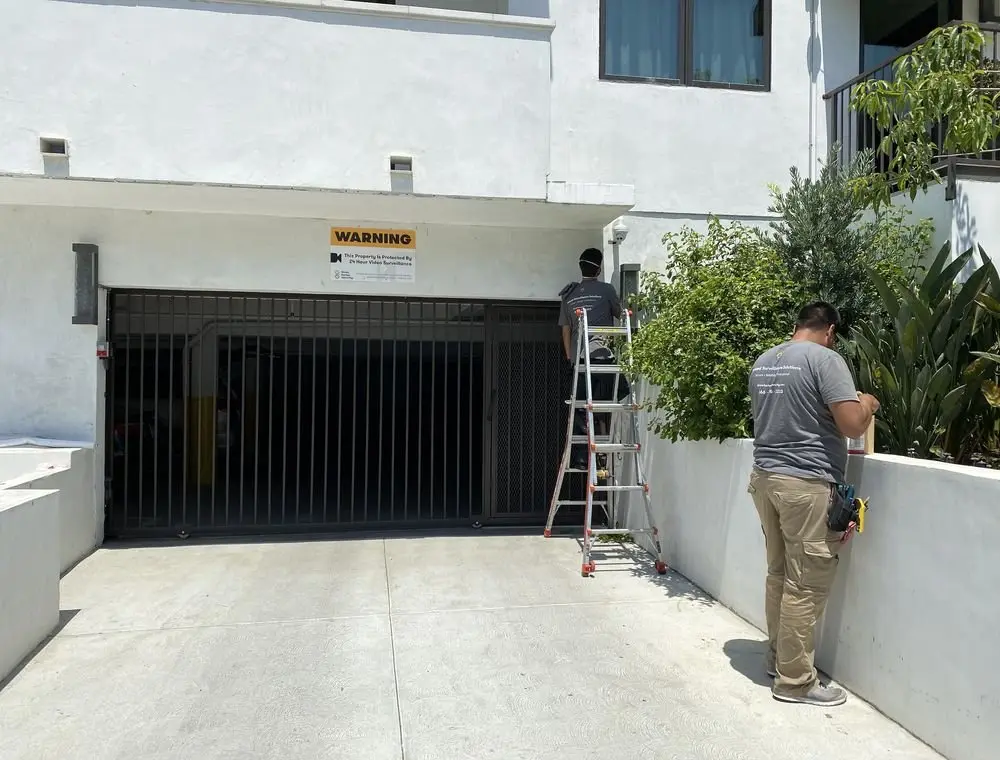 Fieldwork inLos Angeles
Authentic Three Factor Security field work
Practical guidance informed by real project conditions.
Our planning resources reflect the questions, constraints, and decisions that appear during site reviews, installation, commissioning, handoff, maintenance, and system expansion.
View more project experienceBegin with a professional assessment