
Intrusion & alarm protection
Alarm systems designed around every perimeter, opening, and interior zone.
An intrusion alarm system uses detectors, a control panel, communications, and configured notifications to identify unauthorized activity. Three Factor Security designs and installs alarm systems around the property’s occupied and unoccupied conditions, existing infrastructure, verification options, and agreed monitoring requirements.
Designed around the property
Complete scope. Clear handoff. Long-term support.
From a focused residential alarm to a multi-zone commercial deployment, we map the property first and select the right mix of door, window, motion, glass-break, panic, siren, and environmental devices. Zones, schedules, users, backup communications, and response procedures are configured around the way the property operates.
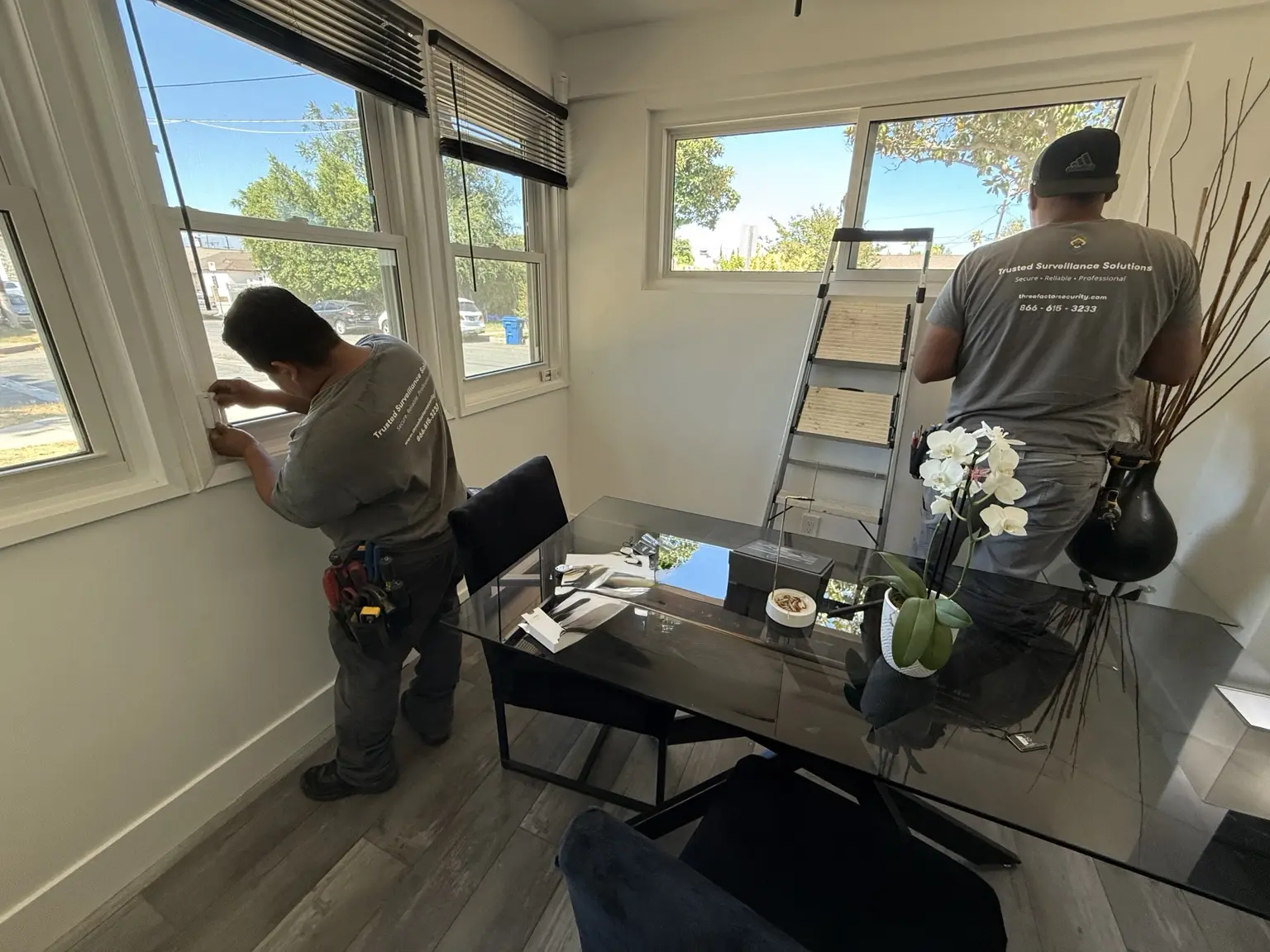 Fieldwork inRedondo Beach
Alarm protection at the opening
Window and door detection installed around real entry points.
Our technicians fit alarm contacts to the property, connect them to the wider system, program the intended behavior, and test every protected opening before handoff.
Window and door contactsPanel programming and testingClear customer operation
Capabilities
Everything the system needs to work as one.
Indoor and outdoor motion verification
Keypads, sirens, panic, and duress devices
Cellular communication and battery-backup options
App control, user permissions, schedules, opening-and-closing reports, and activity history
Live-monitoring and real-time response connections when selected
What to expect
A structured path from assessment to handoff.
Map the property
Document doors, windows, rooms, outdoor approaches, and the way occupants use the space.
Design protection layers
Choose perimeter, interior, verification, communication, and backup devices for each risk.
Install & configure
Mount devices, establish communications, organize zones and users, and test every trigger.
Train & activate
Set up app access, review arming and opening-or-closing exception workflows, confirm contacts, and connect selected monitoring services.
Related specialties
Intrusion alarmsPerimeter protectionInterior detectionCellular backupPanic & duressApp-based controlOutdoor motion verificationAlarm takeover & upgrades
Alarm operations & outage resilience
Know who opened, what needs attention, and what continues during an outage.
Alarm reliability depends on more than the sensors. We document opening and closing expectations, exception ownership, communication paths, backup power, notification sequence, local behavior, and customer responsibilities so routine operations and outages are both easier to manage.
Primary communication
Confirm whether the panel uses internet, cellular, another supported path, or a coordinated combination for monitoring and remote access.
Backup communication
Review available cellular or alternate-path supervision so one service interruption does not silently remove the intended monitoring connection.
Power & battery support
Size and test panel batteries or supported backup power around the installed devices, communication equipment, expected runtime, and maintenance plan.
Local alarm behavior
Document what sirens, keypads, sensors, and on-site controls continue to do when internet access or off-site services are unavailable.
Notification & response path
Confirm authorized contacts, call order, verification rules, app notifications, monitoring instructions, and supported escalation steps.
Permits & responsibilities
Identify alarm-permit, contact-list, access, testing, battery, and account responsibilities that remain with the property owner or authorized manager.
Opening & closing review
Use supported arming, disarming, early-open, late-close, and failure-to-arm history to identify operating exceptions without treating every event as an emergency.
Exception ownership
Define which manager reviews recurring schedule exceptions, missing users, shared codes, unusual activity, and contact changes—and how corrections are documented.
Available reports, communication paths, supervision, backup operation, monitoring actions, and runtime vary by the selected platform, carrier coverage, installed equipment, permissions, written agreement, and site conditions.
Service-specific planning tools
Prepare the next decision with a practical resource.
Common questions
Clear answers before the project begins.
Guidance is prepared and reviewed by Three Factor Security’s named Security Solutions Manager and Security Solutions Engineers. Final recommendations are based on a professional assessment, the existing infrastructure, the property’s operating needs, and the systems selected.
What is the difference between a monitored and unmonitored alarm system?
An unmonitored system may sound a local siren or send a direct app notification, leaving the response to the property owner or staff. A monitored system sends supported alarm events to a monitoring center that follows the approved verification and notification plan and, when appropriate, requests emergency response.
How can false alarms be reduced?
False alarms are commonly caused by user mistakes, unsecured openings, unsuitable sensor placement, pets, or devices that are not calibrated for the environment. We address those causes with practical user workflows, appropriate sensor selection, zone planning, testing, and verification options such as linked video where supported.
Does my city require an alarm permit or charge false-alarm fees?
Many Southern California jurisdictions require an alarm permit or registration and may charge escalating fees for repeated false dispatches. Rules differ by address and may change. Permit responsibility and the applicable local requirements should be confirmed with the city or responding agency as part of project planning.
What happens to the alarm system during a power outage?
Alarm panels and selected communications equipment can be backed by batteries or a UPS. Actual runtime depends on the panel, connected devices, battery capacity and condition, communication method, and any applicable code or monitoring requirements. Backup duration is calculated for the installed system rather than assumed from a universal number.
Can an alarm system integrate with cameras and access control?
Yes, when the selected platforms support the required integration. An alarm event can be paired with relevant video, door status, notifications, or a defined access-control action so staff and monitoring personnel have better context. Every automated action is reviewed for safety, permissions, and the intended response workflow.
What if someone cuts the phone or internet line?
Modern monitored alarm systems can use cellular communication as a primary or backup path. We review the available carriers, signal strength, supervision, backup power, and communication sequence so a single connection failure does not silently remove the intended monitoring path.
Is professional alarm monitoring worth it for a small business?
For many businesses with inventory, cash, controlled areas, or periods without staff on-site, professional monitoring adds a defined response path when no one is available to evaluate an alert. The value depends on the property and risk profile. Some insurers may consider monitored protection, but coverage and any discount should be confirmed directly with the carrier.
Can I arm, disarm, manage users, and review events remotely?
Yes, on systems that include supported remote management. Authorized administrators can typically arm or disarm, manage codes or users, receive notifications, and review event history from an app or web interface. Permissions are configured so each person receives only the access needed for their role.
Southern California service areas
Complete security offering
Coordinate this service with every layer of protection.
Explore the other systems and services Three Factor Security can design, install, monitor, and support around the same property.
Security Camera Systems
Professionally designed camera systems for dependable coverage, useful evidence, intelligent alerts, and secure viewing from anywhere.
Explore serviceLive Monitoring & Remote Site Surveillance
Construction site monitoring and trained operator oversight for staffed, unattended, distributed, temporary, and high-risk properties that need dependable remote visibility.
Explore serviceVirtual Security Guard & Incident Response
Commercial and residential virtual security guard service with live remote patrols, event verification, authorized audio talk-down, and coordinated response while incidents are developing.
Explore serviceIntercom Systems
Audio and video intercom systems that help teams identify visitors, communicate clearly, and release doors or gates with confidence.
Explore serviceAccess Control Systems
Secure, manageable access control for doors, gates, garages, elevators, and shared spaces—installed around daily operations.
Explore serviceEarly Detection Systems
AI analytics, perimeter technology, thermal sensing, and intelligent alerts designed to identify developing threats before they become damaging incidents.
Explore serviceGates, Fencing & Perimeter Security
Professionally designed pedestrian gates, vehicle gates, perimeter gates, and fencing—with gate operators, LPR-based vehicle entry, access control, and intercom release integrated around the property.
Explore serviceSecurity Audio & Emergency Communication Systems
Purpose-built speakers, paging, talk-down, duress, and security communication systems that help teams warn, direct, deter, and respond in real time.
Explore serviceSecurity System Upgrades & Modernization
Carefully planned upgrades for aging, unreliable, unsupported, or poorly documented camera, alarm, access-control, intercom, recording, and monitoring systems.
Explore serviceConsulting & System Design
Property-specific consulting, system audits, design documentation, budgeting, and phased security roadmaps built around real operating needs.
Explore servicePreventive Maintenance & System Health
Scheduled inspections, system-health reviews, cleaning, testing, updates, and documented recommendations for dependable long-term performance.
Explore serviceProject support
Clear terms. Dependable follow-through.
Coverage, service terms, and handoff requirements are documented for each project. Preventive maintenance, diagnostics, upgrades, and expansion options remain available as the property evolves.
Review our service commitment →Resiliency planning
Plan what the system should do when normal conditions are interrupted.
Backup power, alternate communication, local recording, health alerts, and documented recovery steps are selected around the property and service agreement—not assumed.
UPS capacity, safe shutdown, and expected runtime
Internet, cellular, and supported alternate paths
Local, edge, or cloud behavior during an outage
Health notifications, ownership, and escalation
Verification after service is restored
Related evidence & planning
Monitoring responsibilities
Professional monitoring is provided through independent monitoring providers. Three Factor Security installs and configures the supported technology and coordinates the agreed service scope. Enrolled events, service hours, verification, talk-down, notifications and dispatch coordination depend on the selected platform and written monitoring agreement. Self-monitored options rely on the customer receiving and acting on alerts.
Understand monitoring and response responsibilitiesBegin with a professional assessment